The Load Example button is able to replicate the example inputs shown in this help page for quick testing of the DeepGE web server. Simply click the Load Example button then press Submit Job to obtain an example results page.
The example sequence is 180 bp: long enough for the Cas9 Variant and Base Editing legs, and short enough that the Prime Editing leg, which designs a pegRNA for every position it can reach, returns without the long run a larger input costs it.
(Prime Editors) Pick a Prime Editor System (PE2max in HEK293T is recommended for most users). Toggle Advanced Prime Editing Settings only if you know what you're doing, and you have read SynDesign documentation. The defaults work for most cases. Note: Prime Editors may take more than dozens of minutes to hours due to the large number of possible guide RNA designs.
Choose an Input Format under Input Data — FASTA, Gene Symbol, NMID, Ensembl ID, HGNC ID, Genomic Position, Edit Sequence (an unedited/edited pair), ClinVar ID or COSMIC ID — and fill in the field it shows. Whichever you pick reaches all three legs of the run. For FASTA, choose Enter FASTA Text or Upload a FASTA File and provide your sequence(s); when uploading files, press the [+] button to add files, and clear uploads with either of the checkmark buttons.
At least one mode must be selected — DeepGE will refuse to submit otherwise.
A gene identifier is looked up in Human (GENCODE v50 on GRCh38) or Mouse (GENCODE M39 on GRCm39). The selector appears with the four gene formats, and it is offered wherever the genome-wide off-target search offers Mouse, so a run that screens against the mouse genome can design in mouse as well.
A mouse symbol from an older nomenclature resolves to the current one and the job log states the substitution — Olfr1 designs against Or1e16. Whichever of the four gene formats is chosen, Mouse replaces the identifier box with Enter Mouse Gene Name or ID, which takes a mouse symbol or a mouse Ensembl gene ID. ClinVar ID and COSMIC ID carry no species selector: both are human variant databases, and both resolve against the human reference.
Olfr1
Or1e16
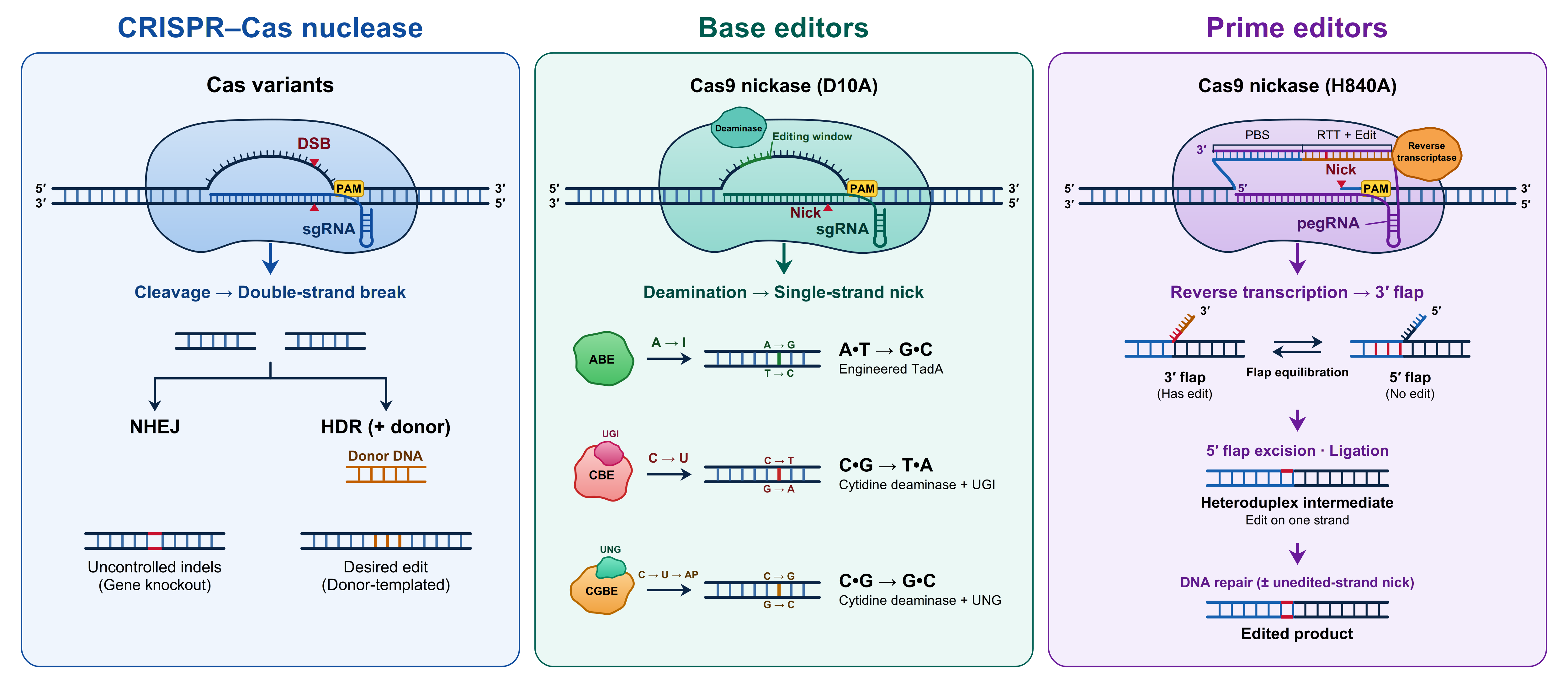
There is no HDR mode switch: the input format decides. When the input format specifies an edit — ClinVar ID, COSMIC ID, or an unedited/edited sequence pair — the CRISPR-Cas leg of the run also returns what each candidate guide needs for HDR: the cut site, the cut-to-edit distance, single-stranded donor oligos in the orientation(s) you chose, the realised and requested homology arm lengths, an optional blocking mutation, and each candidate's donor rank within its target.
The base-editing and prime-editing legs accept the same inputs that specify an edit, and return no donor. That is not an omission: a base editor deaminates within its own activity window and makes no double-strand break for a donor to repair from, and in prime editing the pegRNA's own reverse-transcription template already is the repair template.
What you can set: homology arm lengths (100/100 nt by default, 50/50, or a custom pair between 25 and 1000 nt), the donor strand, whether to add a blocking mutation, and the donor template type — a chemically synthesized single-stranded oligodeoxynucleotide (ssODN) by default, with the donor note saying when a template outgrows standard oligo synthesis and should be ordered as a long single-stranded DNA (ssDNA) fragment instead; long ssDNA for those longer templates; or a double-stranded DNA (dsDNA) duplex, which arrives as one Duplex donor (dsDNA) column instead of the strand pair. The guide sequence is deliberately not yours to specify — the guides are the models' own ranked candidates, and a donor is built for each of them.
Duplex donor (dsDNA)
These settings are forwarded to every selected leg, so one choice governs the CRISPR-Cas, base-editing and prime-editing results alike; the pegRNA Form controls below reach the prime-editing leg, which is the one that designs an extension.
Cloning Vector decides whether each row carries an ordering-ready spacer oligo pair, and it is set to SpCas9 / lentiGuide-Puro (BbsI or BsmBI) by default. The pair arrives as Oligo (forward) and Oligo (reverse): the two strands that anneal into the digested vector, each presenting its own 4 nt 5' overhang — CACC on the forward strand, AAAC on the reverse — around a guide written (G/g)N19. Setting the vector to None (No Oligo Output) leaves both columns out rather than blank, and the four overhang fields — Forward 5′, Reverse 5′, Forward 3′ and Reverse 3′ — override what the vector supplies, each taking the vector's own where it is left blank.
Oligo (forward)
Oligo (reverse)
CACC
AAAC
pegRNA Form decides what the extension oligos encode. Left at pegRNA (Unmodified 3' End), each row carries one extension oligo pair, GTGC and AAAA overhangs by default and overridable through the four Extension fields beside them.
GTGC
AAAA
Setting it to epegRNA (Adds a 3' Structured Motif) appends a 3' structured motif to the extension, which protects the pegRNA 3' end from exonucleolytic degradation, and adds the motif's own extension column and oligo pair per motif. epegRNA Motif Panel, shown only while epegRNA is selected, chooses which motifs: the Recommended Panel (eHAV, tevo2.0, HAV), the Extended Panel (those three plus eSBRMV1-A, FMDVA-2 and tevopreQ1), Synthetic / LNP (eSBRMV1-A), the v5 Library Screen Panel (eHAV, tevo2.0, HAV, eSBRMV1-A, eFMDVA-2.2 and eFMDVO-4), or any single motif on its own. An epegRNA is a different construct to order from a pegRNA, which is why the motif is asked for rather than applied by default, and the panel is offered rather than ranked because no feature predicts which motif wins.
No linker is inserted between the primer binding site (PBS) and the motif. The v2 motifs offered here are used by Sakai et al. with the motif joined directly to the PBS 3' end; for tevopreQ1, Nelson et al. compared pegLIT-designed 8-nucleotide linkers against no linker and reported no significant gain. The one motif whose data shows a linker is needed, mpknot, is not offered here.
The results of the CRISPR–Cas9 Variants and Base Editing legs always include an Off-target score (higher = less specific) column: a mismatch-tolerance score from the SpCas9 cutting frequency determination (CFD) table, computed without a genome search. Setting Genome-wide off-target search to Human or Mouse additionally searches that genome on both legs and adds one Genome-wide specificity (higher = more specific) column per guide, condensed from every site the search finds; the individual loci are not listed. Genome-search scoring chooses how those sites are aggregated — the CFD table, the MIT/Hsu position weights, or both columns side by side — and is forwarded to both legs, so a guide is scored the same way whichever leg reports it. The prime-editing leg carries neither column — the only PE off-target model is DeepPrime's own, on the standalone DeepPrime workflow.
Each selected mode renders its own results section on the results page:
Modes that fail for a given input simply show "no outputs were produced" — the rest of the page still displays normal results.
Users are able to select the row of the results for details of the target sequences.
One additional visualization for Base Editing results is the capability to press any editing-efficiency score, which will visualize the single base editor and sgRNA mode result(s) for the specific target sequence. Colour ranks a score against the rest of its own column in this table -- green for the top quarter, red for the bottom -- so it says how a candidate compares with its neighbours rather than whether it can be opened.
Users can download each of the genome editing tool results by clicking the Download Results button at the end of each result section.
The following example interactive outputs are available for reference:
If you have any questions, bug reports, or suggestions, please do not hesitate to contact us through the Support page.